深度搜索示例
本章节提供了一个深度搜索的示例:利用streamlit实现可视化的深度搜索过程。
环境设置
首先需要创建conda环境并安装依赖:
pip install crawl4ai
pip install requests
pip install json5
pip install pillow
pip install beautifulsoup4
pip install qwen-agent
pip install datasets
pip install tenacity
pip install volcengine-python-sdk
pip install langchain
pip install langchain-community
pip install langchain-core
pip install streamlit
设置API密钥:
export SERPER_API_KEY=YOUR_SERPER_API_KEY
运行应用:
streamlit run tests/deepsearch/test_deepsearch.py
核心功能
RAG检索工具
RAGRetrieve 工具执行基于语义相似度的文档检索:
@register_tool('rag_retrieve', allow_overwrite=True)
class RAGRetrieve(BaseTool):
    description = 'A tool that performs RAG retrieval based on semantic similarity.'

    def call(self, params: str, **kwargs) -> str:
        # 计算查询嵌入向量
        # 与文档嵌入向量进行相似度计算
        # 返回最相关的文档
网络搜索工具
WebSearch 工具使用Serper API执行网络搜索:
@register_tool('web_search', allow_overwrite=True)
class WebSearch(BaseTool):
    description = 'A tool that performs web search using Serper API.'

    def call(self, params: str, **kwargs) -> str:
        # 发送搜索请求到Serper API
        # 并行抓取搜索结果的内容
        # 返回格式化的搜索结果
示例查询
系统支持多种类型的多跳查询,例如:
相关查询
queries = [
    {
        "query": "Who is the founder of the company that launched the Falcon Heavy rocket?",
        "expected": [2, 3, 7, 8]
    },
    {
        "query": "Which city is home to Tesla's Gigafactory? What vehicle models are produced there?",
        "expected": [11, 12]
    }
]
知识库文档
系统使用预定义的知识库文档:
documents = [
    {"id": 1, "text": "Tesla, Inc. was founded in 2003 by engineers Martin Eberhard and Marc Tarpenning."},
    {"id": 2, "text": "Elon Musk joined Tesla in early 2004 as an investor and became CEO in 2008."},
    # ... 更多文档
]
深度搜索过程
系统通过以下步骤处理深度搜索:
初始查询分析:解析用户查询,识别需要的信息类型
工具选择:根据查询复杂度选择合适的工具(RAG检索或网络搜索)
信息检索:执行检索操作获取相关文档或网页内容
中间推理:分析检索结果,生成中间假设或子问题
迭代检索:基于中间结果进行后续检索步骤
最终回答:综合所有检索信息生成最终答案
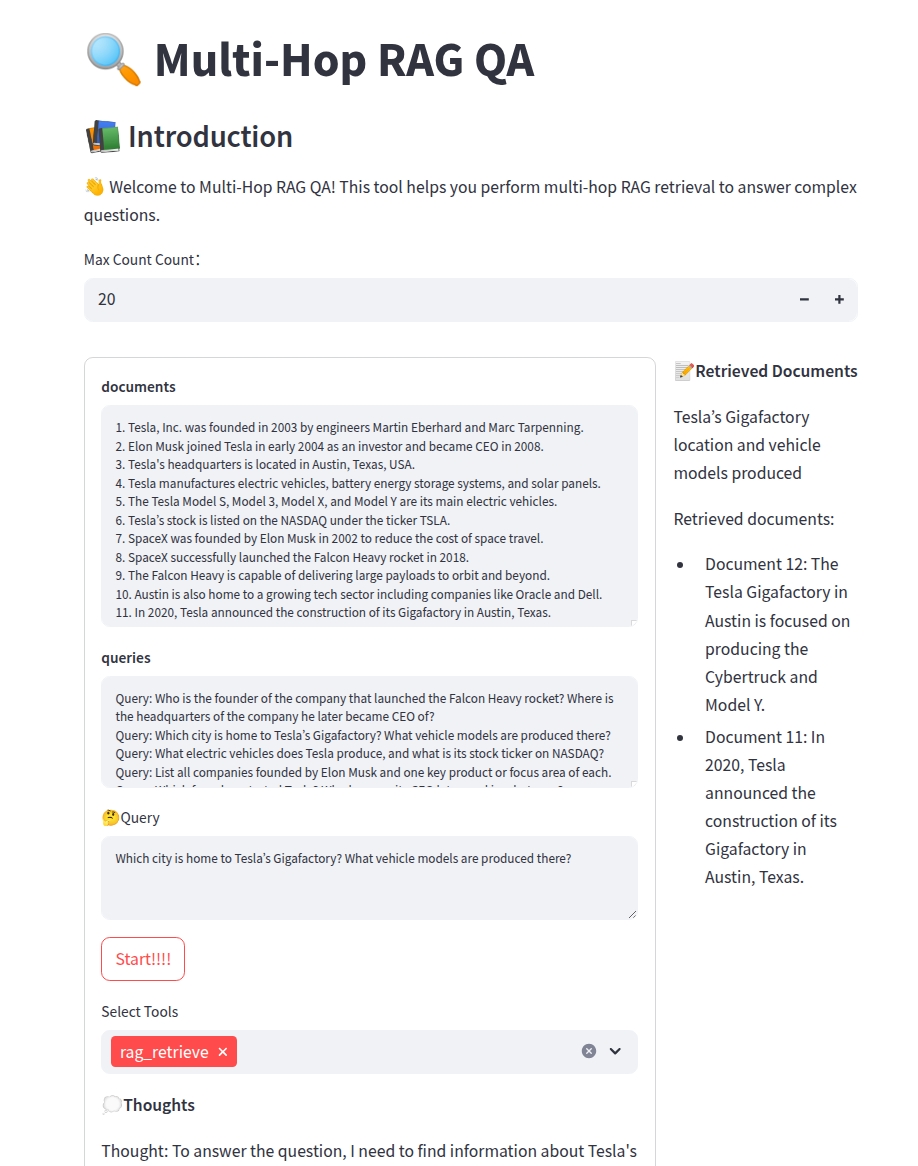
界面展示
系统提供Streamlit Web界面,包含:
文档显示区域
查询输入框
工具选择器
检索过程可视化
最终答案展示
下图展示了应用程序的主界面: